
Track Request-for-Pay Aging in Real-Time with FedNow®, RTP®, and QBO
Reduce AR Aging and Accelerate Cash Flow Using ISO 20022 RfP Messaging
✅
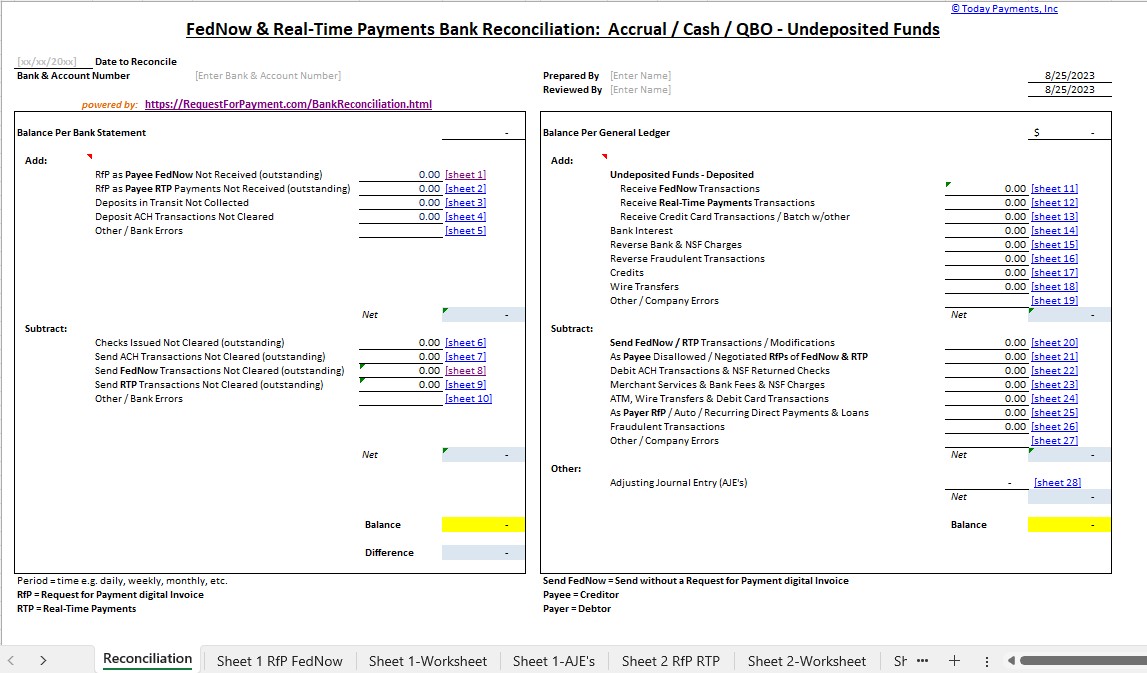
"FREE" RfP Aging & Real-Time Payments Bank Reconciliation – with all merchants process with us.


 End the AR Waiting Game —
Instantly Reconcile with RfP Aging Tools
End the AR Waiting Game —
Instantly Reconcile with RfP Aging Tools
Businesses that rely on delayed
collections, check processing, or manual reconciliation
struggle with unpredictable cash flow. With FedNow®
and RTP® real-time rails, you can now send,
track, and reconcile digital payment requests instantly,
using ISO 20022-based Request for Pay (RfP™).
Our smart invoicing tools let
merchants send real-time payment links by email, SMS,
QuickBooks®, or QR code—and track aging statuses
instantly. You’ll know which RfPs are pending,
approved, or expired—right from your QuickBooks®
Desktop or Online dashboard.
Best of all? We provide FREE real-time payments bank reconciliation, trusted by bookkeepers, accountants, treasurers, and CFOs nationwide.
Our mission is to empower businesses to eliminate aging AR by enabling real-time, ISO 20022-compliant Request for Payments (RfP™) across FedNow® and RTP® with full bank reconciliation in QuickBooks®.
TodayPayments.com is a leading platform for real-time digital invoicing, delivering Request-for-Pay (RfP™) via FedNow® and RTP® with smart ISO 20022 messaging. Our solution offers unmatched transparency in payment tracking, from initiation to reconciliation, with built-in QuickBooks® Desktop Enterprise and QBO integration. With free reconciliation and mobile-friendly invoicing, we make real-time treasury a reality for any business.
See
the features
QuickBooks® ACH, Cards, FedNow and Real-Time Payments
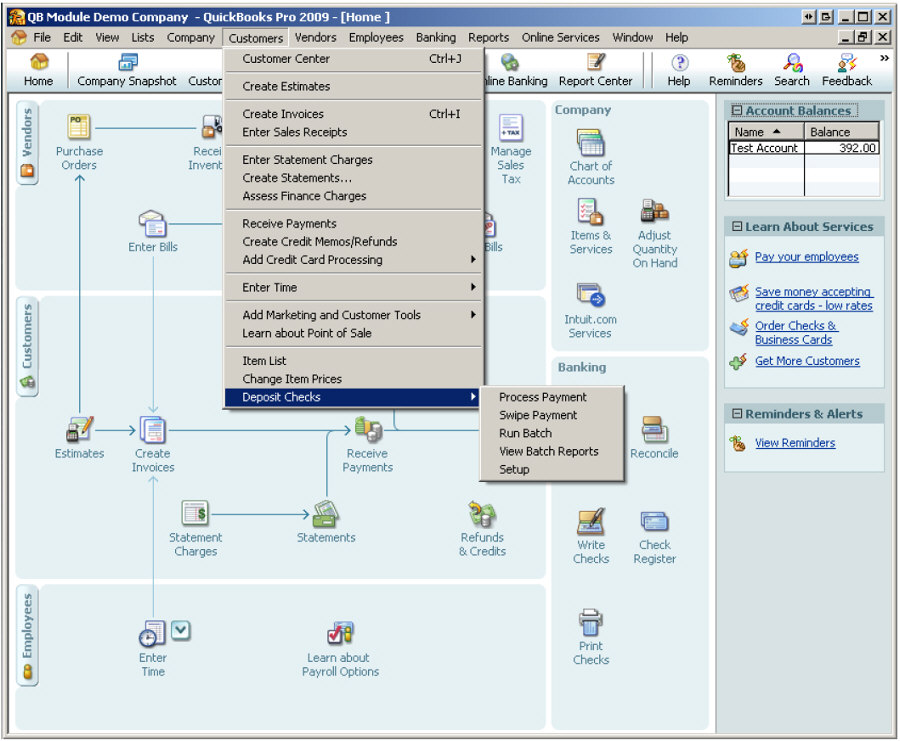
- Payment processing for all QuickBooks desktop, Pro, Premier, Enterprise and also QBO QuickBooks Online Our software is designed for simplicity and ease-of-use.
- ~ Automate Account Receivable Collection
- ~ Automate Account Payable Payments
- ~ One-time and Recurring Debits / Credits
Secure QB Plugin payment processing through QuickBooks ® specializes in the origination of moving money electronically.
Fully Integrated with QuickBooks® Desktop Enterprise and Online
Request for Payments (RfP™) Parameters, Attributes, Benefits & Features
ISO 20022 Parameters for RfP
|
Field |
Purpose |
|
MsgId |
Unique ID for each request |
|
CreDtTm |
Timestamp for audit trails and aging reports |
|
ReqdExctnDt |
Requested payment/due date |
|
Dbtr |
Debtor (customer) information |
|
DbtrAcct |
Alias (email/phone) or account number |
|
Cdtr |
Creditor (merchant/payee) information |
|
CdtrAcct |
Destination account or alias |
|
Amt |
Payment amount requested |
|
RltdRmtInf |
Invoice number, purchase ID, or billing reference |
|
Ustrd |
Optional free-text notes |
|
RgltryRptg |
Optional field for regulatory or reconciliation identifiers |
Attributes
- ISO 20022 native messaging (.XML, .JSON, Excel-friendly)
- Alias-based invoicing (no routing/account numbers needed)
- SMS, mobile, hosted page, QR code, and email-compatible
- Real-time payment status updates (sent, viewed, paid, declined)
- Works with RTP®, FedNow®, ACH, and other payment rails
- Full integration with QuickBooks® Desktop and Online (QBO)
- Recurring RfPs for subscription or batch models
- POS, MOTO, and Ecommerce compatibility
- Batch upload for multi-payment use cases
Benefits
- Real-time AR monitoring – instantly see which requests are unpaid, paid, or overdue
- Free real-time reconciliation tools – perfect for bookkeepers, treasurers & CFOs
- 24/7 availability – get paid any time, even weekends or holidays
- Instant good funds – no holds, no batching, no reversals
- Reduced AR aging – cut collection cycles in half
- Chargeback-proof – RTP® and FedNow® payments are irrevocable
- Alias-powered requests – reduce friction using customer’s email or mobile
- QuickBooks® integrated – sync transactions and reconcile automatically
- Supports ISO 20022 RfP formatting for certainty and compliance
Minimum ISO 20022 Data Fields Required for Request-for-Pay (RfP™)
To initiate a valid ISO 20022-compliant RfP over RTP® or FedNow®, the following fields are required:
- MsgId – Unique RfP identifier
- CreDtTm – Request creation timestamp
- Dbtr & DbtrAcct – Payer identification (alias or account)
- Cdtr & CdtrAcct – Merchant/payee details
- Amt – Exact payment amount requested
- ReqdExctnDt – Desired execution or due date
- RltdRmtInf – Reference number for invoice or billing context
These elements enable bank-to-bank A2A payments with complete remittance metadata and real-time settlement tracking.
Ask us How:
Using ISO 20022 Request-for-Pay (RfP™) with FedNow® and RTP® empowers businesses to issue real-time payment requests across all U.S. financial institutions. With full compatibility for QuickBooks® Desktop Enterprise and QBO, merchants can batch-send invoices, track RfP aging, and reconcile payments the moment they are received.
RfPs can be delivered via SMS, mobile phone, hosted pages, or QuickBooks-generated links, and paid using aliases (email or mobile number), giving customers a frictionless way to authorize payments.
Our system supports Excel, .XML, and .JSON formats to upload batches of A2A transactions with full visibility over B2B, C2B, or recurring invoice payments. With 24/7 access to instant funds and zero chargebacks, your business finally gains the payment certainty and transparency it deserves.
If your solution involves a "Pay Button" to work with QuickBooks Online (QBO) and integrates with Request For Pay Aging digital invoices, you likely have a system that facilitates payments and invoicing. Here's a guide to help you understand and improve your solution:
1. Understand Your Solution:
- Integration Points: Clearly understand how your "Pay Button" integrates with QBO and handles Request For Pay Aging invoices. Identify the key functionalities and workflows.
2. Optimize the Pay Button Workflow:
- User Experience: Ensure that the Pay Button provides a seamless and user-friendly experience for initiating payments. Minimize the number of steps required for users to complete a payment transaction.
- Confirmation and Feedback: Implement confirmation messages and feedback to users after a payment is initiated. This helps in providing transparency and assurance.
3. QBO Integration:
- API Integration: If your solution uses APIs to integrate with QBO, ensure that the integration is robust and secure. Follow best practices for API usage and authentication.
- Data Mapping: Review how data is mapped between your solution and QBO. Make sure that the relevant information from the Pay Button transactions is accurately reflected in QBO.
4. Request For Pay Aging Digital Invoices:
- Invoice Management: Understand how your solution handles Request For Pay Aging digital invoices. Ensure that the aging information is accurately calculated and presented to users.
- Automation: If possible, automate the aging calculation process to reduce manual effort and minimize errors.
5. Security and Compliance:
- Data Security: Ensure that your solution follows industry best practices for data security. This is crucial, especially when dealing with financial transactions and sensitive information.
- Compliance: Stay compliant with relevant regulations and standards, especially those related to financial transactions and data privacy.
6. Testing:
- End-to-End Testing: Conduct thorough end-to-end testing of your solution. This includes testing the Pay Button functionality, QBO integration, and Request For Pay Aging invoice processing.
- User Acceptance Testing (UAT): Involve users in UAT to gather feedback and identify any issues before deploying updates or new features.
7. Documentation:
- User Guides: Provide comprehensive user guides that explain how to use the Pay Button, initiate payments, and manage Request For Pay Aging digital invoices.
- Technical Documentation: Document the technical aspects of your solution, including the integration points with QBO and any APIs used.
8. User Support:
- Customer Support: Ensure that there is a reliable customer support system in place to assist users with any issues or queries related to the Pay Button and invoice processing.
9. Monitoring and Analytics:
- Transaction Monitoring: Implement monitoring tools to track Pay Button transactions and identify any anomalies or issues in real-time.
- Analytics: Use analytics to gather insights into user behavior, transaction patterns, and system performance.
10. Feedback Loop:
- User Feedback: Establish a feedback loop to collect user feedback and suggestions for improvement. Regularly update your solution based on user needs and industry trends.
By focusing on these aspects, you can enhance the functionality and reliability of your solution that involves a "Pay Button" for QBO integration and Request For Pay Aging digital invoices. Regularly assess the evolving needs of your users and adapt your solution accordingly.
Salesy Conclusion: Real-Time Treasury Starts Now — And It's Free
Tired of chasing payments and manually reconciling aging AR?
With TodayPayments.com, your business can:
- Send real-time RfPs via FedNow® or RTP®
- Track invoice aging live from your QuickBooks® interface
- Accept payments through mobile, email, QR, and hosted pages
- Enjoy FREE real-time bank reconciliation
- Eliminate delays with 24/7 instant payments
- Sync with QBO or QuickBooks® Desktop Enterprise for seamless posting and reconciliation
Don’t let aging invoices hold your business back.
Start getting paid faster—with total transparency—only at 👉
TodayPayments.com
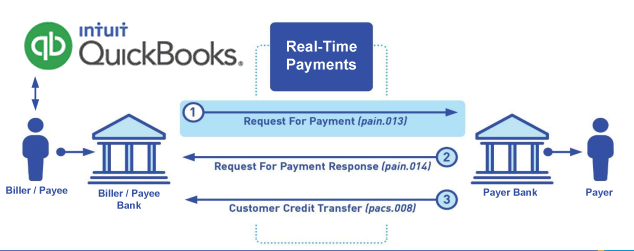
Call us, the .csv and or .xml Request for Payment (RfP) file you need while on your 1st phone call! We guarantee our reports work to your Bank and Credit Union. We were years ahead of competitors recognizing the benefits of RequestForPayment.com. We are not a Bank. Our function as a role as an "Accounting System" in Open Banking with Real-Time Payments to work with Billers to create the Request for Payment to upload the Biller's Bank online platform. U.S. Companies need help to learn the RfP message delivering their bank. Today Payments' ISO 20022 Payment Initiation (PAIN .013) show how to implement Create Real-Time Payments Request for Payment File up front delivering message from the Creditor (Payee) to it's bank. Most banks (FIs) will deliver the message Import and Batch files for their company depositors for both FedNow and Real-Time Payments (RtP). Once uploaded correctly, the Creditor's (Payee's) bank continuing through a "Payment Hub", will be the RtP Hub will be The Clearing House, with messaging to the Debtor's (Payer's) bank.
Our in-house QuickBooks payments experts are standing ready to help you make an informed decision to move your company's payment processing forward.
Pricing with our Request For Payment Professionals
1) Free ISO 20022 Request for Payment File Formats, for FedNow and Real-Time Payments (The Clearing House) .pdf for you manually create "Mandatory" (Mandatory data for completed file) fields, start at page 4, with "yellow" highlighting. $0.0 + No Support
2) We create .csv or .xml formatting using your Bank or Credit Union. Create Multiple Templates. Payer/Customer Routing Transit and Deposit Account Number may be required to import with your bank. You can upload or "key data" into our software for File Creation of "Mandatory" general file.
Fees = $57 monthly, including Support Fees and Batch Fee, Monthly Fee, User Fee, Additional Payment Method on "Hosted Payment Page" (Request for file with an HTML link per transaction to "Hosted Payment Page" with ancillary payment methods of FedNow, RTP, ACH, Cards and many more!) + $.03 per Transaction + 1% percentage on gross dollar file,
3) Payer Routing Transit and Deposit Account Number is NOT required to import with your bank. We add your URI for each separate Payer transaction.
Fees Above 2) plus $29 monthly additional QuickBooks Online "QBO" formatting, and "Hosted Payment Page" and WYSIWYG
4) Above 3) plus Create "Total" (over 600 Mandatory, Conditional & Optional fields of all ISO 20022 Pain .013) Price on quote.
Start using our Bank Reconciliation:
Dynamic integrated with FedNow & Real-Time Payments (RtP) Bank Reconciliation: Accrual / Cash / QBO - Undeposited Funds
Give Us A Call
(866) 927-7180